Đánh Giá & Phân Tích Kỹ Thuật: D-LINK DAP-2310
D-LINK DAP-2310 là thiết bị phần cứng chuyên dụng thuộc phân nhóm Điểm Truy Cập WiFi Doanh Nghiệp Trong Nhà Mật Độ Cao, được thiết kế nhằm đáp ứng các tiêu chuẩn kỹ thuật khắt khe nhất về độ ổn định, hiệu năng truyền tải và độ bền công nghiệp trong các hệ thống hạ tầng mạng doanh nghiệp và trung tâm dữ liệu hiện đại.
1. Tổng Quan Kiến Trúc & Bối Cảnh Triển Khai Thực Tế
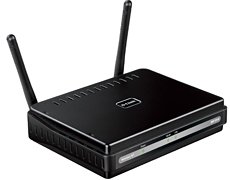
Description: The DAP-2310 AiPremier N Access Point is an 802.11n access point ideal for any network administrator to create or expand the capacity of a wireless network. This access point is mainly used in high traffic areas such as airports, coffee shops, shopping centers, sporting venues, and university campus deployments. With transfer rates of up to 300Mbps in the 2.4GHz frequency range, users are able to connect with legacy 802.11b/g adapters in addition to the latest 802.11n adapters to enjoy faster downloads and instant communication. Versatile Access Point The DAP-2310 allows network administrators to deploy a highly manageable and extremely robust 802.11n wireless network. The included antennas are detachable and provide optimal wireless coverage in the 2.4GHz (802.11g and 802.11n) band using a high power radio design to reduce dead spots and increase capacity. For advanced installations, this high-speed access point has integrated 802.3af Power over Ethernet (PoE)3, making installation easy in areas where power outlets are not readily available. Enhanced Performance The DAP-2310 delivers reliable wireless performance with maximum wireless signal rates of up to 300Mbps in the 2.4GHz wireless band. This coupled with support for Wi-Fi Multimedia (WMMTM) Quality of Service features, makes it an ideal access point for audio, video, and voice applications. Additionally, the DAP-2310 supports load balancing features to ensure maximum performance by limiting the maximum number of users per Access Point. Security To help maintain a secure wireless network, the DAP-2310 provides the latest in wireless security technologies by supporting both Personal and Enterprise versions of WPA and WPA2 (802.11i) with support for a RADIUS server backend. To further protect your wireless network, MAC Address Filtering, Wireless LAN segmentation, Disable SSID Broadcast, Rogue AP Detection, and Wireless Broadcast Scheduling are also included. The DAP-2310 includes support for up to eight VLANs for implementing multiple SSIDs to further help segment users on the network. It also includes a wireless client isolation mechanism, which limits direct client-to-client communication. Multiple Operation Modes To maximize total return on investment, the DAP-2310 can be configured to optimize network performance based on any one of its multiple operation modes: Access Point, Wireless Client, Wireless Distribution System (WDS), and WDS with Access Point. With WDS support, network administrators can set up multiple DAP-2310 access points throughout a facility and configure them to bridge with one another while providing network access to individual clients. Also included are advanced features such as Load Balancing, which optimizes high network traffic volume, and redundancy for fail-safe wireless connectivity. Additionally, the DAP-2310 offers Spanning Tree Protocol support for greater efficiency and to protect against broadcast storms when used in WDS mode. Network Management Network administrators have multiple options for managing the DAP-2310, including a Web interface (HTTP), Secure Sockets Layer (SSL, which provides for a secure connection to the Internet), Secure Shell (SSH, which provides for a secure channel between local and remote computers), and Telnet. For advanced network management, administrators can use the D-Link AP Manager II or D-View SNMPv3 management module to configure and manage multiple access points from a single location. In addition to a streamlined management process, the AP Manager II and D-View software provide network administrators with the means to verify and conduct regular maintenance checks remotely, eliminating the need to send personnel out to physically verify proper operation. With 2.4GHz band functionality, extensive manageability, versatile operation modes, and solid security enhancements, the D-Link DAP-2310 AirPremier N Access Point provides SMB environments with a business-class solution for deploying a wireless network in the workplace.
Độ ổn định cấp doanh nghiệp: Vận hành bền bỉ với chỉ số MTBF (Mean Time Between Failures) vượt trội, chịu tải liên tục trong môi trường Data Center. Tiết kiệm năng lượng & Tản nhiệt thông minh: Thiết kế luồng khí làm mát tối ưu, kiểm soát nhiệt độ linh kiện ở mức lý tưởng, tăng tuổi thọ linh kiện phần cứng. Bảo mật & Quản trị tập trung: Dễ dàng triển khai, giám sát từ xa thông qua giao diện quản lý chuyên nghiệp, hỗ trợ đầy đủ các tiêu chuẩn bảo mật doanh nghiệp.
2. Bảng Thông Số Kỹ Thuật Chi Tiết
| Thuộc Tính Kỹ Thuật | Chi Tiết Cấu Hình & Tiêu Chuẩn |
|---|
| Tính năng phần cứng nổi bật | Thiết bị wifi D-Link DAP-2310 |
| General features | Network, Standards, – IEEE 802.11n, – IEEE 802.11g, – IEEE 802.3ab, – IEEE 802.3af3, – IEEE 802.3u, – IEEE 802.3, Management, – Telnet – Secure (SSH) Telnet, – Web Browser Interface, – HTTP – Secure HTTP (HTTPS), – SNMP Support, – D-View Module – Private MIB, – AP Manager II, – AP Array, Security, – WPATM – Personal, – WPA2TM – Enterprise, – WPA... |
| FCC | 25dBm / ETSI: 17dBm (Dual Chain), LEDs, Power, LAN, WLAN, Maximum Power Consumption |
| With PoE3 | 9 watts |
| Without PoE | 8 watts, Operating Voltage, 5 V/2 A or PoE3, Temperature |
| Operating | 0° to 40°C, 10% to 90% (Non-condensing) |
| Storage | 20° to 65°C, Humidity, 5% to 95% (Non-condensing), Certifications, FCC Class B, CE, WiFi®, Weight, 238 g, Dimensions, 148 x 28 x 111 mm, 1 This unit is designed for indoor environments, you might violate local regulatory requirements by setting up this unit in outdoor environments., 3 Please note that PoE support is determined by specific part n... |
3. Phân Tích Kỹ Thuật & Kiến Trúc Phần Cứng Chuyên Sâu
3.1. Chipset RF Đa Băng Tần Chuẩn WiFi 6/6E/7 Đột Phá Băng Thông
Công nghệ điều chế đỉnh cao 1024-QAM / 4096-QAM: D-LINK DAP-2310 hỗ trợ đồng thời các băng tần 2.4GHz, 5GHz và 6GHz, cung cấp thông lượng truyền dữ liệu không dây cực đại lên đến hàng Gigabits/giây.
Kỹ thuật phân chia kênh truyền OFDMA & MU-MIMO: Cho phép phục vụ đồng thời hàng trăm thiết bị di động cùng một lúc mà không bị xếp hàng chờ đợi, giảm độ trễ xuống dưới 10ms cho các ứng dụng thực tế ảo và hội nghị trực tuyến.
3.2. Mảng Anten Thông Minh Beamforming Định Hướng Tín Hiệu Số
Tự động hội tụ chùm sóng về thiết bị: Mảng anten tích hợp thông minh tự động nhận biết vị trí của điện thoại, máy tính bảng để tập trung công suất phát sóng trực tiếp, vượt qua các vật cản như tường kính, vách ngăn văn phòng.
Cân bằng tải băng tần (Band Steering): Tự động điều hướng các thiết bị đời mới lên băng tần 5GHz/6GHz thông thoáng, giải phóng băng tần 2.4GHz cho các cảm biến IoT.
3.3. Chuyển Vùng Không Gián Đoạn (Seamless Roaming IEEE 802.11k/v/r)
Thời gian chuyển vùng siêu tốc < 50ms:*
Người dùng có thể vừa di chuyển giữa các tầng văn phòng vừa đàm thoại video hoặc gọi VoIP mà không hề bị gián đoạn hay rớt cuộc gọi.
Quản trị sóng vô tuyến tự động (Auto-RRM): Các điểm truy cập tự động lắng nghe môi trường xung quanh để điều chỉnh công suất phát và tự chọn kênh truyền (Channel) không bị trùng lặp nhiễu sóng.
3.4. Quản Trị Đám Mây Tập Trung & Cấp Nguồn Qua Cáp Mạng PoE
Cấp nguồn PoE chuẩn 802.3at/bt: Cấp nguồn điện và truyền dữ liệu đồng thời qua một sợi cáp mạng duy nhất, loại bỏ sự rườm rà của dây nguồn AC truyền thống.
Cổng mạng Uplink 2.5GbE / 5GbE Multi-Gigabit: Khai phóng tối đa tốc độ không dây của chuẩn WiFi thế hệ mới mà không bị giới hạn bởi cổng mạng 1Gbps cổ điển.
4. Hướng Dẫn Lắp Đặt, Cấu Hình Tối Ưu & Quy Trình Bảo Trì Kỹ Thuật
Để đảm bảo thiết bị D-LINK DAP-2310 vận hành ổn định, an toàn và đạt hiệu năng tối đa, quy trình lắp đặt và bảo trì cần tuân thủ các tiêu chuẩn kỹ thuật sau:
- Khảo sát vùng phủ sóng thực tế (Heatmap Survey): Bố trí điểm truy cập tại vị trí trung tâm trần thạch cao, tránh đặt gần các hộp kỹ thuật kim loại hoặc ống thông gió gây cản trở sóng RF.
- Quy chuẩn độ cao lắp đặt: Treo thiết bị ở độ cao lý tưởng từ 2.8m đến 3.5m so với mặt sàn để góc phủ sóng anten đạt hiệu quả tối ưu nhất.
- Kích hoạt tính năng cách ly khách hàng (Client Isolation): Phân tách mạng WiFi nội bộ và WiFi khách (Guest Portal) để bảo vệ các máy chủ và máy in trong mạng công ty.
5. 4 Đặc Quyền Vàng Khi Mua Thiết Bị Tại VietITPro
🛡️ 100% Linh Kiện Chính Hãng: Cam kết nguồn gốc xuất xứ rõ ràng, đầy đủ chứng nhận CO/CQ từ nhà sản xuất. ⚡ Đội Ngũ Kỹ Sư Chuyên Môn Cao: Tư vấn kiến trúc hạ tầng, cấu hình tối ưu tận nơi và hỗ trợ kỹ thuật chuyên sâu 24/7. 🔄 Chính Sách Bảo Hành Đổi Mới Nhanh Chóng: Đổi mới linh hoạt theo tiêu chuẩn nhà sản xuất, giảm thiểu tối đa thời gian gián đoạn của doanh nghiệp. 🚚 Giao Hàng & Đóng Gói Chống Tĩnh Điện: Đóng gói chuyên dụng nhiều lớp chống sốc tĩnh điện (ESD Safe), giao hàng hỏa tốc trên toàn quốc.